
13.2 Data Plotting and Curve‑Matching Methods
Software packages accommodate importing time‑drawdown data from spreadsheets or data recorders. Plot choices include linear, semi‑log or log‑log plots. In addition, a plot of the slope of the drawdown curve can be selected as an option. This plot of ∆s/∆log(t) is called a derivative plot (Figure 100). A derivative plot of the appropriate type curve and field data can be used to further support the automatically‑derived, or visually‑aided, curve match. Typically, the software generates the drawdown derivative over specified time intervals calculated as shown in Figure 101. If the size of the time interval is small then the derivative plot can be noisy, making it difficult to identify trends. Typically, methods to reduce noise and smooth the data are implemented. AQTESOLV provides three methods to smooth the derivative data including methods by Bourdet and others (1989) as well as by Spane and Wurstner (1993).
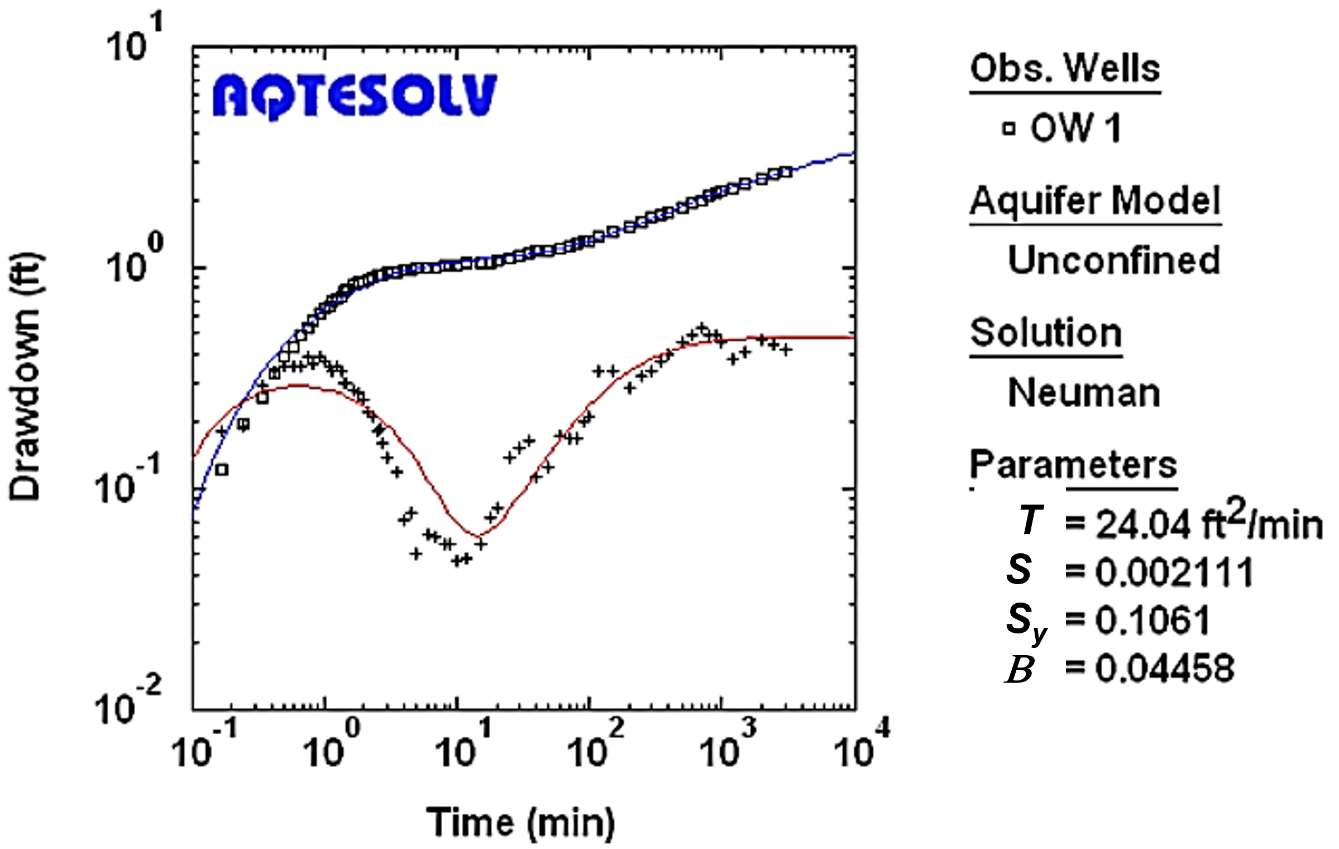
Figure 100 ‑ Log‑log plot of observation well time‑drawdown (squares) and computed time derivative data (plus signs) for a hydraulic test of an unconfined aquifer produced in AQTESOLV (Neuman, 1972). Parameters are in units of gallons, feet, and days. Type‑curve solutions derived by using the Neuman analytical representation were selected for curve matching (blue line is the type curve and red line is the computed derivative of the selected type curve) (from the aqtesolv.com web site).
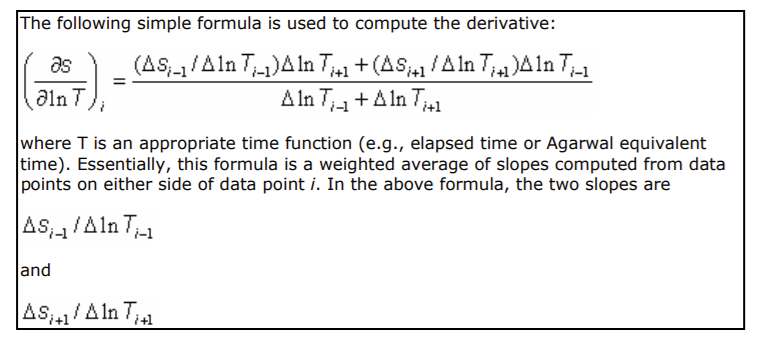
Figure 101 ‑ Explanation of the method used to compute the derivative of the drawdown‑time data and type curves as presented in AQTESOLV V4.5 User’s Guide (2004‑2007).
These software programs can also help the user understand the nature of the groundwater system because the characteristic shape of the drawdown versus time curve in the different plotting domains (i.e., arithmetic, semi‑log, log‑log, and particularly the derivative graph) provides insight into the most appropriate conceptual model of the aquifer and the behavior of the pumping well.
Popular aquifer‑test analysis software programs are commercial products using proprietary software and must be purchased (although demo or student versions are available). Boxes describing the specific software packages are included in this book to provide a general description of the individual software capabilities and functions and provide examples of program results. They are not intended to be comprehensive. Each program has a downloadable demonstration, trial, or student version that can be used to get a free introduction to the software. As previously stated, these three software packages are considered the industry standards. AQTESOLV V4.5 is described in Box 5, AquiferTest V12 is described in Box 6, and Aquiferwin32 V6 is described in Box 7.
Most agencies and consultants use one or more of these three software packages to analyze hydraulic‑testing results. When analyses of hydraulic‑test data sets are routinely required, one of the commercially available programs can be a useful part of a hydrogeologic toolbox.
The next section describes performing and analyzing slug tests.